Shoot the Sky: A Middle Georgia Guide to Stunning Fireworks Photos From Any Camera You Own
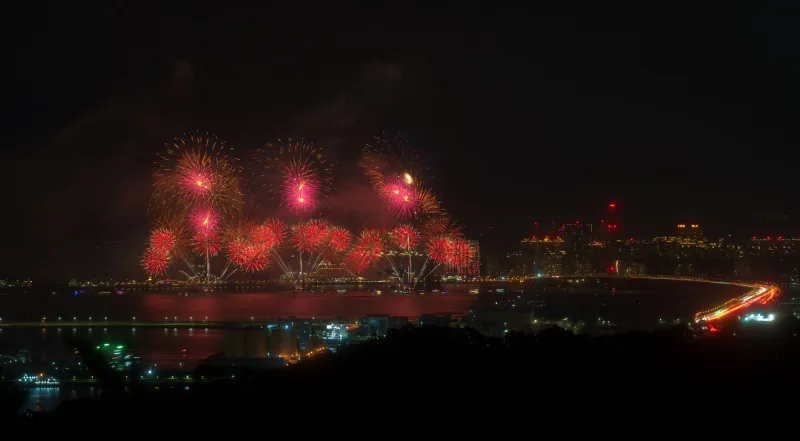
Every summer, thousands of Macon residents tilt their phones toward the sky and tap the shutter button at exactly the wrong moment. The result? A blurry smear of color that looks nothing like the brilliant burst they actually witnessed. Sound familiar? You're not alone — and the good news is, the fix is simpler than you'd think.
Whether you're working with a flagship smartphone, a hand-me-down DSLR, or something in between, the principles of great fireworks photography are the same. We talked to a few local photographers who've spent years chasing the light over Macon's skyline, and they handed over the tips they wish someone had given them earlier.
Why Fireworks Are Trickier Than They Look
Fireworks photography sits in a weird middle ground. The subject is bright, but the background is dark. The action is fast, but the best shots actually require a slow shutter. Add in Middle Georgia's notoriously thick summer humidity — which scatters light and creates a soft haze around every burst — and you've got a genuinely challenging scene.
"People think it's just point and shoot," says Macon-based photographer Darius Webb, who's been documenting local events around Bibb County for nearly a decade. "But fireworks are basically moving light in a dark room. Your camera doesn't know what to expose for unless you tell it."
That's the core insight: automatic mode is your enemy here. Whether you're on a phone or a mirrorless camera, getting manual control over your settings is the single biggest upgrade you can make.
Camera Settings That Actually Work
For DSLR or mirrorless users:
Set your camera to manual mode and start with these baseline settings, then adjust from there:
- ISO: Keep it low — 100 to 200. Fireworks are bright enough on their own, and a high ISO will flood your image with grain.
- Aperture: Somewhere between f/8 and f/16 works well. A tighter aperture keeps more of the burst in sharp focus.
- Shutter speed: This is the fun part. A shutter speed between 2 and 6 seconds lets you capture the full arc of a burst as it opens. Use a remote shutter release or your camera's self-timer to avoid camera shake when you press the button.
- Focus: Switch to manual focus and set it to infinity (or pre-focus on a distant light before the show starts). Autofocus will hunt around in the dark and miss every shot.
For smartphone users:
Modern phones have more manual control than most people realize. On iPhone, apps like Halide or even the built-in Camera app (with exposure lock) can help. Android users can dig into Pro mode in the native camera app on most Samsung or Google Pixel devices.
The key settings to chase on your phone:
- Lower ISO (or "sensitivity")
- Longer shutter speed (1–4 seconds if your app supports it)
- Lock focus before the show starts
If your phone has a "fireworks" scene mode, it's worth trying — but manual control almost always beats it.
The Humidity Factor: Shooting in Middle Georgia's Summer Air
Here's something the generic photography guides don't tell you: Macon's heat and humidity change the game. On a muggy July night near the Ocmulgee, the air is full of moisture, and that moisture scatters light. Bursts look softer, halos appear around bright shells, and smoke from early rounds lingers longer than it would in drier climates.
Local photographer Keisha Tanner, who's shot several community events in the Cherry Blossom City, has a few workarounds:
"I try to position myself slightly upwind if I can figure out the breeze direction before the show," she says. "Smoke drifting toward you kills the clarity of later shots. And I actually embrace the haze sometimes — it can give shots a dreamy, painterly quality if you lean into it during editing."
Another tip: shoot earlier in the show. The first 10 to 15 minutes typically have cleaner air before smoke builds up. Some of the most technically sharp shots happen before the grand finale, not during it.
Location, Composition, and Getting the Shot You Actually Want
The best fireworks photo isn't just a burst on a black background — it's a scene. Think about what makes Macon's celebrations feel like Macon.
Include foreground elements when you can: the Ocmulgee River reflecting color, the roofline of a historic downtown building, a crowd with upturned faces. These details transform a generic fireworks shot into something that actually tells a story.
"I always try to arrive at least 45 minutes early to find my spot," Darius says. "Once the show starts, you're stuck wherever you are. Scout it out, set up your composition, and then just wait."
For composition basics:
- Rule of thirds: Don't center every burst. Let the fireworks occupy one side of the frame with sky or landscape on the other.
- Vertical vs. horizontal: Horizontal works great for wide scenes with landmarks. Vertical can make a single burst feel dramatic and towering.
- Shoot multiple frames: Even with a slow shutter, shoot constantly. You'll delete 80% of your shots, but that remaining 20% will surprise you.
Post-Processing: The Part Everyone Skips
The photo you take is really just a starting point. A little editing goes a long way — and you don't need Photoshop to do it.
On your phone, the built-in Photos app or free tools like Snapseed or Lightroom Mobile can handle everything you need:
- Reduce highlights to bring back detail in overexposed burst centers
- Boost shadows slightly to reveal detail in the crowd or landscape
- Add clarity or texture to make burst trails crisp and defined
- Adjust white balance — fireworks often come out too orange or too cool depending on your camera's automatic reading
Keisha's go-to move: "I always pull the highlights way down first. That's where all the detail is hiding in a fireworks shot. Once you do that, everything else falls into place."
A Few More Things Worth Knowing
- Bring a tripod. Even a small, cheap one makes a massive difference for long-exposure shots. A phone tripod adapter costs less than $15 and fits in your pocket.
- Turn off your flash. It does absolutely nothing from 200 yards away and will actually hurt your shots by confusing the camera's exposure meter.
- Charge your battery and clear your storage card before you leave home. Nothing is worse than running out of space during the finale.
- Be present too. It's easy to spend an entire show staring at a screen. Give yourself a few minutes to just watch. The best photographers know when to put the camera down.
Macon's fireworks season is full of opportunities to practice — from big Fourth of July productions to community events scattered across Middle Georgia throughout the year. Every show is a chance to try something new, dial in your settings, and come home with a shot you're genuinely proud of.
The sky over Middle Georgia puts on a pretty spectacular show. All you have to do is be ready for it.